Purpose: To update company information to fulfil MyInvois’s 55 standardised data fields for e-invoice data collection and processing.
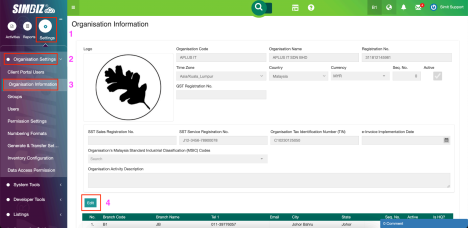
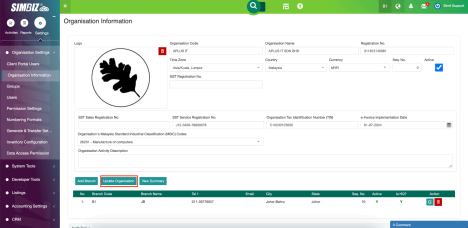
Step 1 : Navigate to Settings > Organisation Settings > Organisation Information. Click the Edit button to make the fields editable.
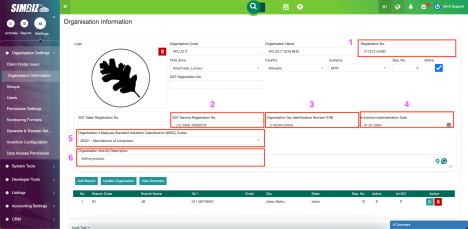
Step 2 : Update your company’s:
- Registration Number [Remarks: Put only the latest business registration number]
- SST Sales/ Service Registration Number (if applicable)
- Organisation as Identification Number (TIN) [Remarks: No space between ‘C’ and the digits]
- e-Invoice Implementation Date*
- Organisation’s Malaysia Standard Industrial Classifications (MSIC) Codes 6. Organisation Activity Description
Notes: You may refer to the MSIC directory here:
https://msic.stats.gov.my/bi/carianKod.php
* If the implementation date is not selected, users cannot insert their Business Partner’s TIN and MSIC on the Business Partner screen as shown here.
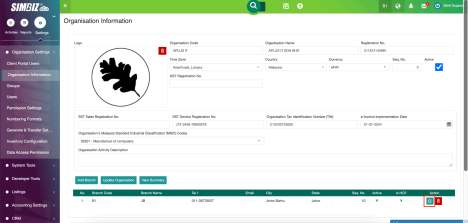
Step 3 : Next, click the Edit icon to update the State of your company address for the e-invoice data collection.
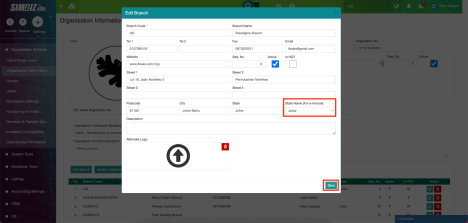
Step 4 : Select the state name for the address and click Save to keep the changes made. Close the box.
Remarks: This is an important step as the State Name here is compulsory for e-invoice data collection
Step 5 : Click the Update Organisation button to save all the updates made.
Was this article helpful?
That’s Great!
Thank you for your feedback
Sorry! We couldn't be helpful
Thank you for your feedback
Feedback sent
We appreciate your effort and will try to fix the article