E-Invoice F&Q for SimBiz 6

Modified on Tue, 17 Sep, 2024 at 9:58 AM

1. Can I bulk submit documents at the same time instead of submitting them one by one?

No, at the moment we do not support bulk submission due to some API limitations.


2. If I use the import wizard to import a sales invoice and turn on auto-submit for e-invoice, will it auto-submit after being imported?
No, due to the lack of bulk submission support, it will not auto-submit when imported. However, you can go to the E-Invoice Monitor page to process the submission.


3. If my customer is a foreign company or a foreigner, should I enter TIN and BRN in the business partner profile?
Refer to LHDN guidelines, there are a few fixed TIN numbers that can be used for special cases, and for BRN, you can put 'NA'.
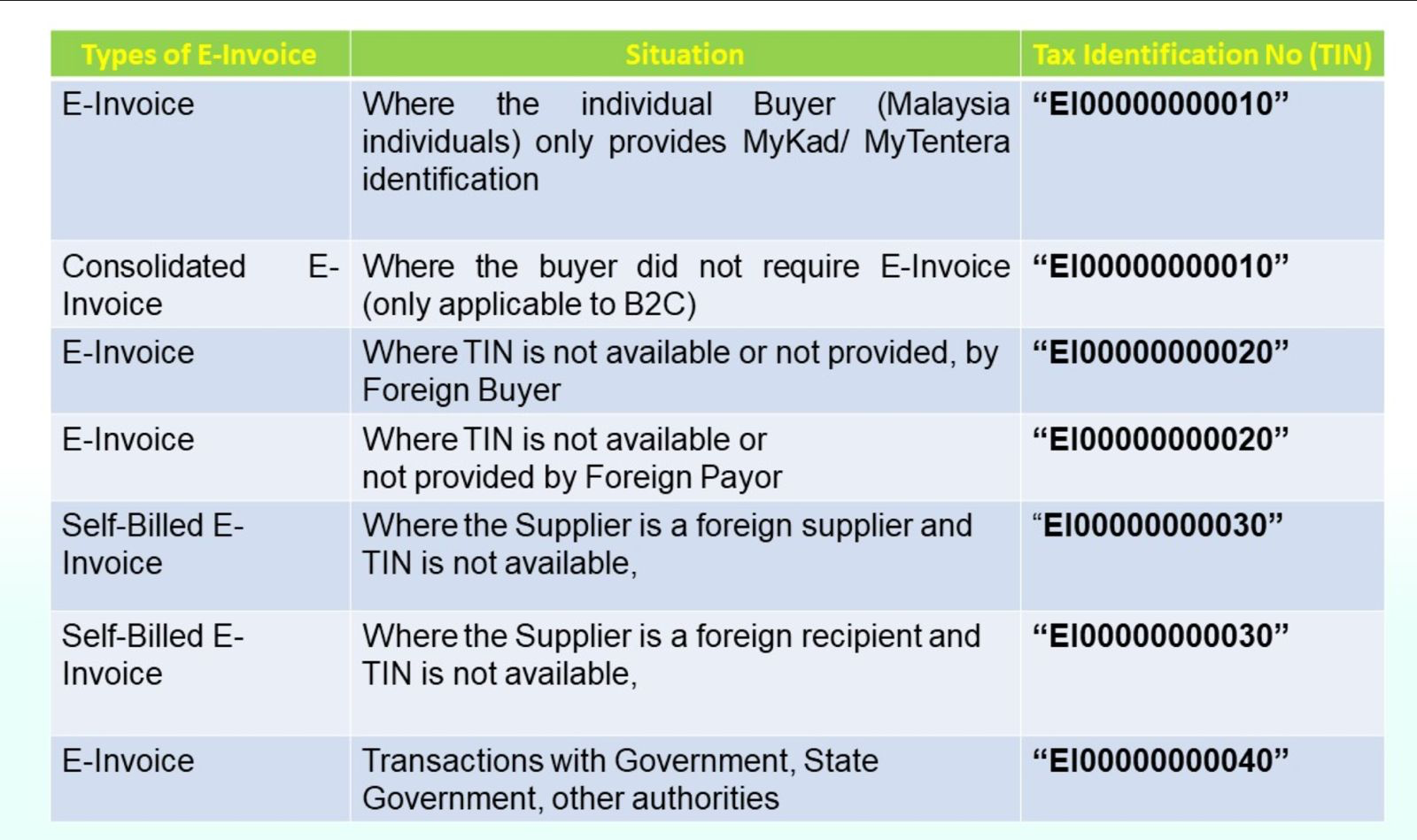
  
4. My supplier is foreign company. What TIN and MSIC should I input for this supplier?
Refer to LHDN guidelines, you need issue self bill and there are a few fixed TIN numbers "EI00000000030, and for MSIC, you can put in your supplier category.
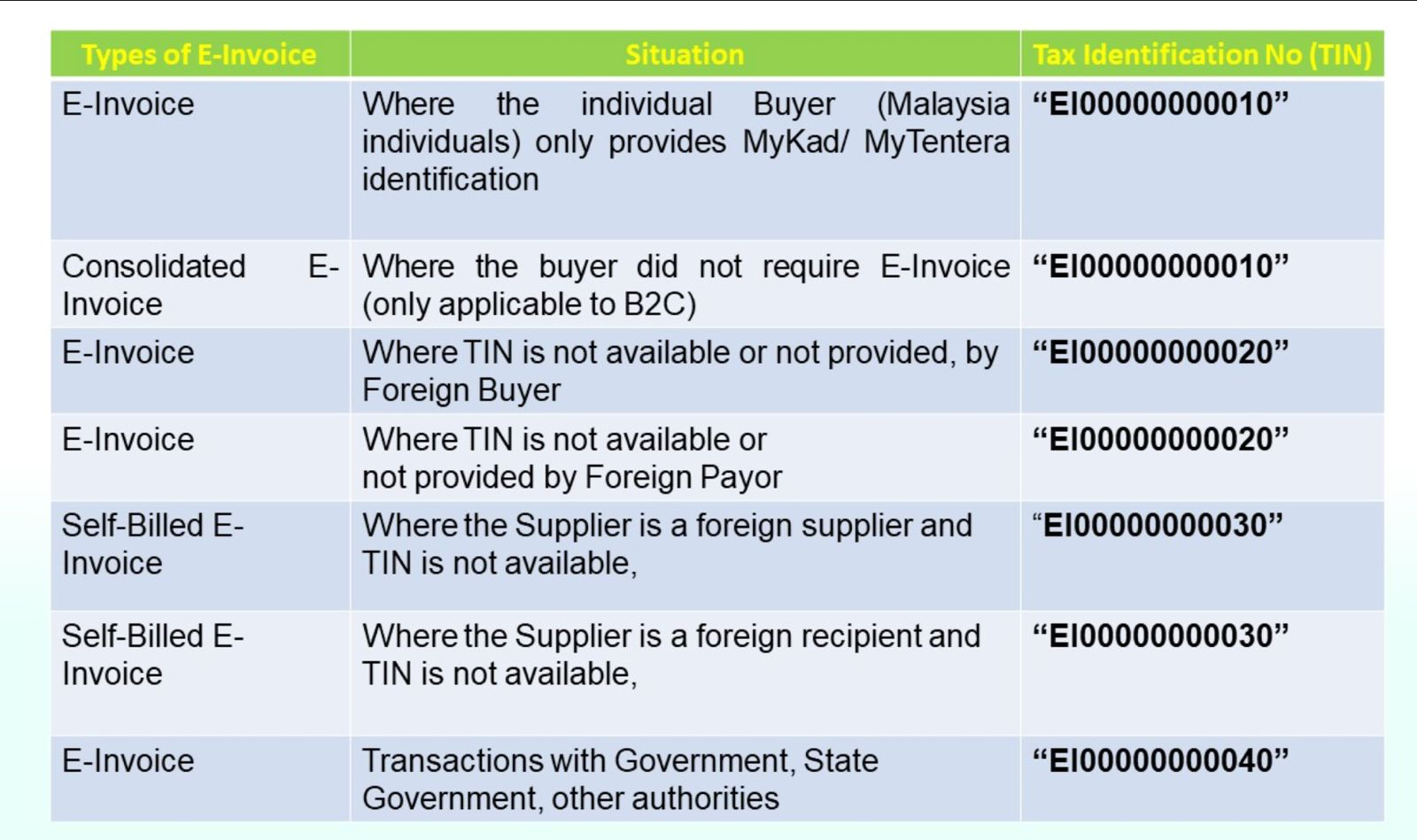
  
5. Why can't I revert my sales invoice after the e-invoice has been validated?
If your sales invoice has been submitted and validated by LHDN, you need to cancel the E-invoice before you can revert the sales invoice.


6. How can I re-submit an e-invoice when it gets rejected?
You can revert the sales invoice and confirm it again to process the resubmission of the E-invoice.


7. If I have multiple organisations in the SimBiz system, do I need to add SIM IT as an intermediary for all MyInvoice accounts?
Yes, E-invoice submission is based on your organisation's TIN and BRN. Therefore, each organisation must add SIM IT as an intermediary to submit E-invoices.


8. Why can't I see the 'Verify TIN' function in my business partner profile?
You need to ensure you have entered your Organisation TIN and e-invoice implementation date in the organisation profile. The 'Verify TIN' function will be visible in edit mode.


9. Why can't I see the 'Submit E-invoice' button on my Sales Invoice screen?
First, ensure that your Organisation TIN and e-invoice implementation date are entered in the organisation profile. If your Sales Invoice screen has been customised previously, please contact our support team for further assistance.


10. What classification code should I choose if none of the options in the list are suitable for me?
You can use '22 - Other' if none of the classification codes are suitable for your item/service.


11. How can I add the E-Invoice QR Code to my customised print format?
You can submit a request to our help desk for assistance with adding the QR code to your customised format.


12. Why does the E-Invoice status keep showing 'Submitted' after I press the submit button?
When we submitted to LHDN, it requires some time for LHDN to validate the record. The processing time can range from a few seconds to several minutes, depending on LHDN's system load.


13. In which field should the phone number data be filled in—under 'Address' or under 'Contact'?
Phone No will based on Address "Tel 1". you can use "NA" instead of blank.

Was this article helpful?

That’s Great!

Thank you for your feedback

Sorry! We couldn't be helpful

Thank you for your feedback

Let us know how can we improve this article!

Select at least one of the reasons
CAPTCHA verification is required.

Feedback sent

We appreciate your effort and will try to fix the article